

8/13/2019 – USED ENDER Printers back in stock! I’ve bought 3.. they help you fix ’em!
Ender 3 Pro $185.00 OBO!
Ender 3 $155.00 OBO!
Ender 5 $249.00 OBO!
CR-10 259.00 OBO!
Be sure to enter win the Whiskey Stash Giveaway for September 2018. You could win a free 3D Printed Whiskey Stash 105mm Howitzer Shell – Replica!
You may also be interested this post if you have time.. it will be helpful
Maker Steve’s 3D Printing Rules to successful 3D Prints
Two days in a row, my brand new Creality Ender 3 has had the coupler let go of the PTFE.
This is what I discovered Wednesday afternoon. Only 25% of my print was completed and I had about a dollar in filament, never to be used again. I typically use dikale 1.75mm filament because it is relatively inexpensive and provides consistent prints roll to roll.
It is worth noting the price dropped from $17.99 on dikale White PLA to $16.99 today. I consider that a bargain.
From afar, I knew I had a problem.


I could see the PTFE tubing disconnected from the Extruder assembly pneumatic connector, or coupler as we call them.

What a mess…
I had such dreams for that print..

So I cleaned it all up by trimming the excess filament.. and heated up the hotend, pulled the filament from the PTFE tubing to the hotend. Then I reinserted the PTFE, gave it a tug and went back to printing.

And today I found this…
I bigger mess…
Same problem.. 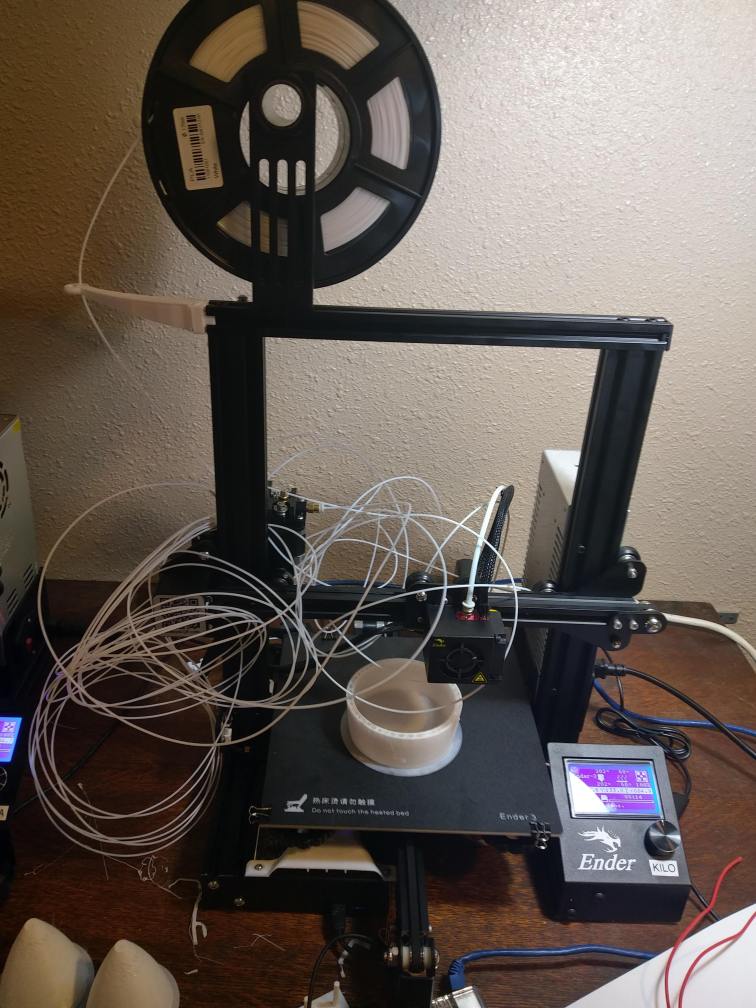
At that point I didn’t trust the coupler any longer and went to my

Pulled a couple spare PTFE connectors
Again, I clipped off all the excess..


Looked at my pile of wasted PLA with the bad coupler..

And installed a new one.. Not so tight as to strip it.. just snug and a little more.
Heated up the hotend to get the remaining filament out of the PTFE going to the hotend.


Gave a slight push to get some positive pressure…
Then pulled out the filament in a smooth rapid motion.
I suspected this was not cut properly or wasn’t clean, you can see it is frayed a bit.
I trimmed off a bit with a razor to square it up. Alternately you can use a PTFE Cutter.
Applied a gentle pressure and let the blade do the work.

Good to go!

I inserted the PTFE in with a forceful motion and pulled on the first ring to lock it in place. I gave it a good tug because I don’t want this to happen again.
Back to printing..
There is a ton of other useful stuff on Makersteve.com and more coming every week.
Be sure to check out my Ultimate Build Guide for Creality Ender 3
If you find this useful, please consider purchasing products through any of the links on the page, it’s free to you and I get a little something for my time. Or, just go shopping at Amazon or Ebay or Gearbest.
You can also support me through Patreon with as little as a dollar a month.
Happy Printing,
Steve